Programming on a German, French or Swedish Keyboard: Every Bracket Located and Counted

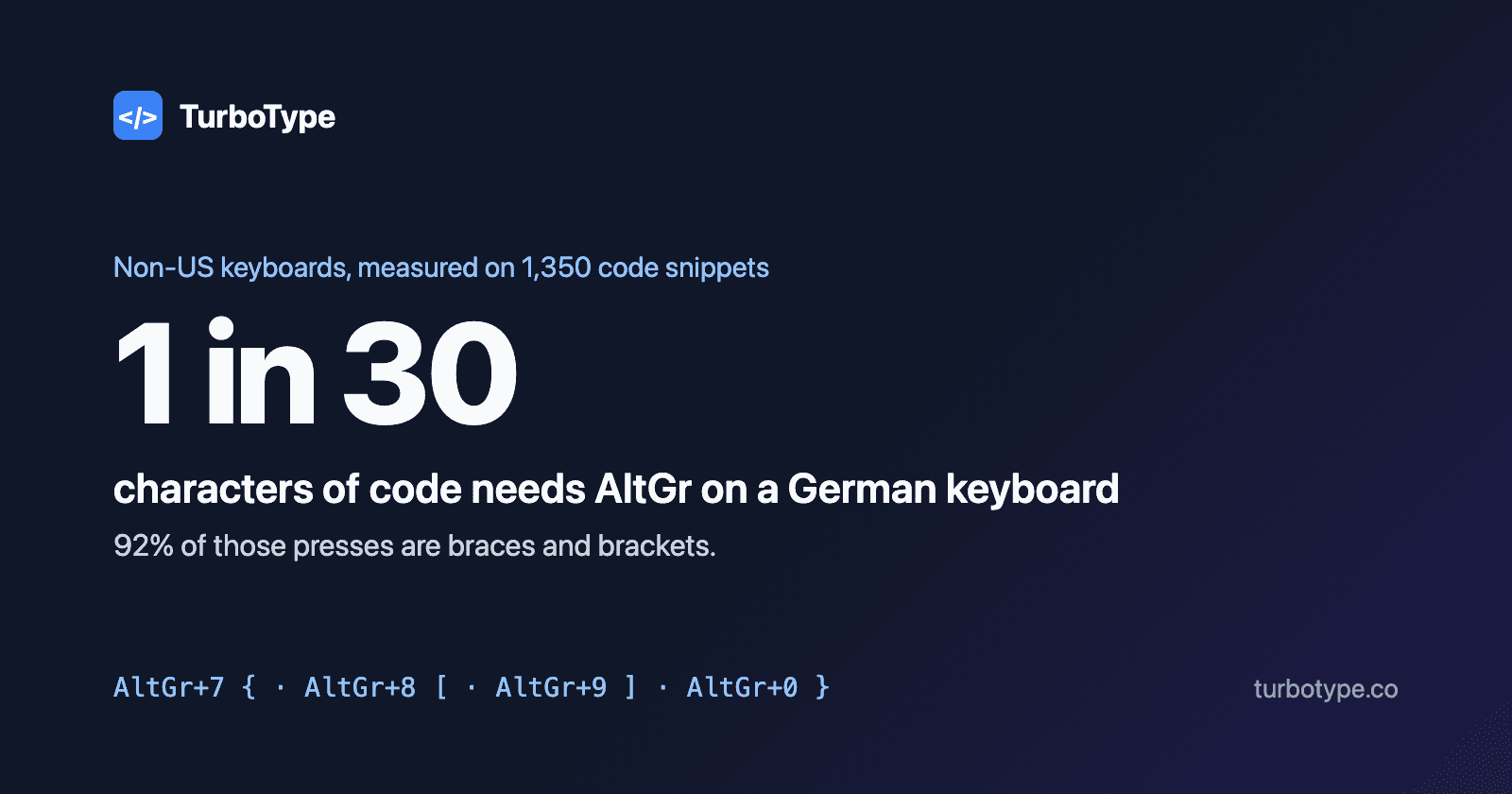
The short answer: on a German keyboard, braces are AltGr+7 and AltGr+0 and square brackets are AltGr+8 and AltGr+9. On French AZERTY they are AltGr+4 and AltGr with the = key, and AltGr+5 and AltGr with the ) key. Swedish matches German and also puts $ behind AltGr. We counted what that costs across 1,350 code snippets: on a German keyboard, one character in every 30 needs AltGr, and 92% of those are braces and brackets. The UK layout costs exactly what US does.
Key Findings
- •
German: 33.4 AltGr presses per 1,000 characters of code, one in every 30. Braces and brackets are 6,356 of the 6,940.
- •
German needs 4.1% more key presses than US, Swedish 3.6% more.
- •
French AZERTY needs the fewest presses of all five layouts, 5.1% fewer than US, because ( ) " : and _ need no Shift. It still needs AltGr for one character in 29.
- •
Swedish PHP is the worst case: every $ is AltGr+4, so one character in 14.5 needs AltGr.
- •
TypeScript needs AltGr most, one character in 21 on German; Python least, one in 55.
Source: TurboType analysis of 1,350 code snippets in nine languages, 207,988 non-space characters, Windows layouts, November 2026.
1. Where Every Coding Symbol Is
Here is where each symbol that code depends on lives on five common Windows layouts. “Then Space” marks a dead key: it waits for the next key so it can add an accent, and pressing Space releases the symbol on its own.
| Symbol | US | UK | German (QWERTZ) | French (AZERTY) | Swedish |
|---|---|---|---|---|---|
{ } | Shift + [ and ] | Shift + [ and ] | AltGr + 7 and 0 | AltGr + 4 and = | AltGr + 7 and 0 |
[ ] | [ and ] keys | [ and ] keys | AltGr + 8 and 9 | AltGr + 5 and ) | AltGr + 8 and 9 |
( ) | Shift + 9 and 0 | Shift + 9 and 0 | Shift + 8 and 9 | ( and ) keys | Shift + 8 and 9 |
\ | \ key | \ key, left of Z | AltGr + ß | AltGr + 8 | AltGr + plus key |
| | Shift + \ | Shift + \ | AltGr + < | AltGr + 6 | AltGr + < |
@ | Shift + 2 | Shift + ' | AltGr + Q | AltGr + 0 | AltGr + 2 |
$ | Shift + 4 | Shift + 4 | Shift + 4 | $ key | AltGr + 4 |
# | Shift + 3 | # key | # key | AltGr + 3 | Shift + 3 |
~ | Shift + ` | Shift + # | AltGr + plus key | AltGr + 2, then Space | AltGr + ¨ key, then Space |
` | ` key | ` key | Shift + ´ key, then Space | AltGr + 7, then Space | Shift + ´ key, then Space |
^ | Shift + 6 | Shift + 6 | ^ key, then Space | ^ key, then Space | Shift + ¨ key, then Space |
; | ; key | ; key | Shift + , | ; key | Shift + , |
: | Shift + ; | Shift + ; | Shift + . | : key | Shift + . |
= | = key | = key | Shift + 0 | = key | Shift + 0 |
/ | / key | / key | Shift + 7 | Shift + : | Shift + 7 |
' | ' key | ' key | Shift + # | 4 key | ' key |
" | Shift + ' | Shift + 2 | Shift + 2 | 3 key | Shift + 2 |
. | . key | . key | . key | Shift + ; | . key |
| Digits | Number row | Number row | Number row | Shift + number row | Number row |
On a Mac, the Option key does what AltGr does, but several symbols move. On a German Mac keyboard braces are Option+8 and Option+9, square brackets are Option+5 and Option+6, the pipe is Option+7, the backslash is Option+Shift+7, @ is Option+L and ~ is Option+N followed by Space. The counts below still apply: each of those is a modifier chord instead of a single key.
The pattern is the same everywhere. National layouts put their own letters, such as ä, ö, ü, é and å, on the keys that US English uses for brackets and punctuation, and move the displaced symbols onto a third level reached with AltGr. That third level is where braces and brackets end up, and they are among the most typed symbols in code.
2. What Each Layout Costs
We took every character in 1,350 snippets from our practice tracks and counted the key presses each layout needs to type it: the key itself, plus Shift or AltGr when needed, plus a Space after a dead key. Capital letters need Shift on every layout, so they add the same amount to all five.
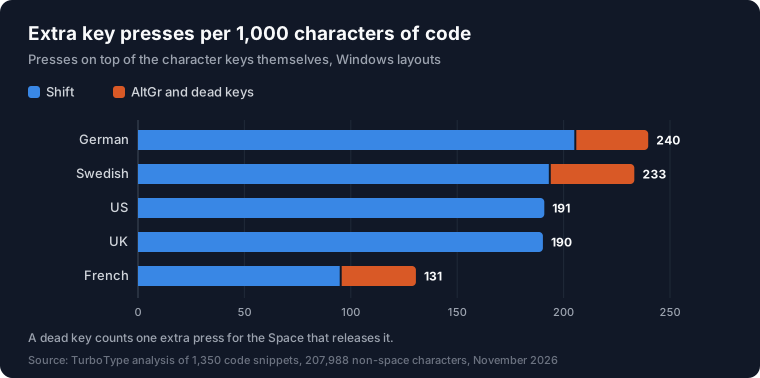
| Layout | Presses per 1,000 characters | Shift | AltGr | Dead-key Space | vs US |
|---|---|---|---|---|---|
| German | 1,239.8 | 206.0 | 33.4 | 0.4 | +4.1% |
| Swedish | 1,233.3 | 194.0 | 38.8 | 0.5 | +3.6% |
| US | 1,190.9 | 190.9 | 0.0 | 0.0 | – |
| UK | 1,190.3 | 190.3 | 0.0 | 0.0 | −0.1% |
| French | 1,130.6 | 95.7 | 34.4 | 0.5 | −5.1% |
German and Swedish come out about 4% more expensive than US. That sounds small, but the extra presses are not spread evenly: they land on the brace and bracket keys, which sit on the number row and need the right thumb on AltGr while the fingers reach up for 7, 8, 9 and 0. A press count cannot show how awkward that chord is; it only shows how often you make it.
The UK layout is the control. It moves a few symbols, putting @ on Shift+' and # on its own key, but nothing goes behind AltGr. It needs 1,190.3 presses per 1,000 characters against 1,190.9 on US, a difference of 0.1%.
3. German QWERTZ
On a German keyboard, 6,940 of the 207,988 characters in our sample needed AltGr, 33.4 per 1,000. Braces alone were 4,726 of them and square brackets 1,630, so 92% of all AltGr presses were the four bracket characters. The rest were the pipe (240), backslash (185), @ (147) and tilde (12).
German also moves several unshifted US symbols onto Shift: the semicolon is Shift+comma, = is Shift+0, the forward slash is Shift+7 and the apostrophe is Shift+#. The semicolon alone is 21.4 characters in every 1,000 of our code, so German needs 206.0 Shift presses per 1,000 characters against 190.9 on US. In return, < and + need no Shift at all.
The backtick is the slowest single character: Shift, the ´ key and then Space, three presses. It matters in JavaScript template literals and Markdown, though it is rare in our sample, 72 times in 207,988 characters.
4. French AZERTY: Fewer Presses, Same Brackets
French AZERTY produced the surprise. It needs 1,130.6 presses per 1,000 characters, 5.1% fewer than US and the lowest of the five layouts. The reason is the number row, where AZERTY puts symbols on the unshifted level: (, ), ", & and _ need no Shift, and neither do :, !, *, $ and < elsewhere on the board. Parentheses are the most common symbols in code, so that saves 108.9 Shift presses per 1,000 characters.
The cost moves elsewhere. Every digit needs Shift on AZERTY, and so do the period and the forward slash, which adds 39.1 Shift presses per 1,000 characters. The period matters more than it looks in code, because most method calls and property accesses use one.
And the brackets still need AltGr: 34.4 AltGr presses per 1,000 characters, one in 29, slightly more than German because # and the backtick need AltGr as well. So AZERTY is cheaper to type by count, but its most common chord is the same awkward one as German's: AltGr with a number-row key.
5. Swedish and the Nordic Layouts
The Swedish layout, which Finland uses too, puts braces and brackets on AltGr+7, 8, 9 and 0 like German, and adds one more symbol code uses constantly: the dollar sign is AltGr+4. That gives Swedish the highest AltGr count of the five, 38.8 per 1,000 characters, one in 26.
The dollar sign makes the difference in PHP, where every variable starts with one. Our 150 PHP snippets contain 1,059 dollar signs, and on a Swedish keyboard one PHP character in 14.5 needs AltGr, the highest figure for any language on any layout we measured. Shell scripts and jQuery hit the same key. Norwegian and Danish arrange some symbols differently but also put braces, brackets and $ behind AltGr.
6. Which Languages Need AltGr Most
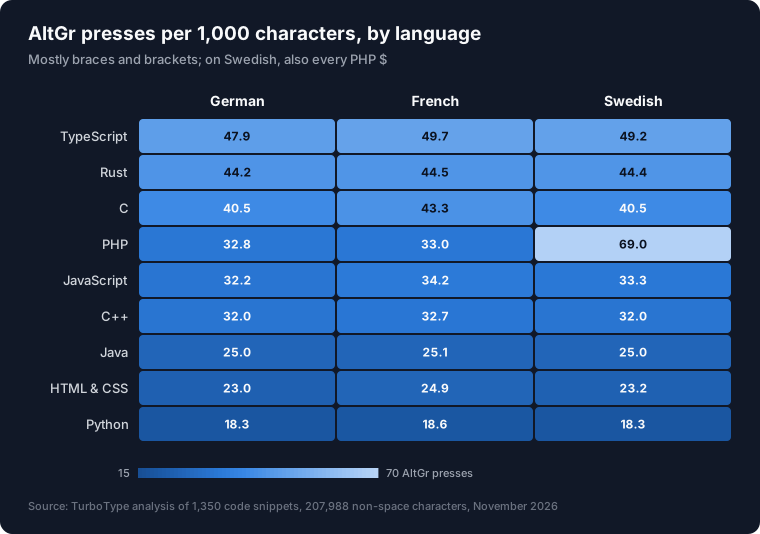
| Language | German | German, 1 in | French | Swedish |
|---|---|---|---|---|
| TypeScript | 47.9 | 1 in 21 | 49.7 | 49.2 |
| Rust | 44.2 | 1 in 23 | 44.5 | 44.4 |
| C | 40.5 | 1 in 25 | 43.3 | 40.5 |
| PHP | 32.8 | 1 in 30 | 33.0 | 69.0 |
| JavaScript | 32.2 | 1 in 31 | 34.2 | 33.3 |
| C++ | 32.0 | 1 in 31 | 32.7 | 32.0 |
| Java | 25.0 | 1 in 40 | 25.1 | 25.0 |
| HTML & CSS | 23.0 | 1 in 43 | 24.9 | 23.2 |
| Python | 18.3 | 1 in 55 | 18.6 | 18.3 |
TypeScript leads because it adds types to JavaScript's braces: object types and interfaces such as { name: string }, array types such as string[] and union types with |. Rust follows with braces for blocks and for every {} placeholder in println!, plus | in closures. C has the most square brackets of any language in our sample, from arrays.
Python needs AltGr least, one character in 55 on German, because indentation replaces braces. Its brackets come from lists, indexing and dictionaries. If you write Python on a German or French keyboard, AltGr is an occasional cost; in TypeScript or Rust it is part of almost every line.
7. Should You Switch to the US Layout?
Some European developers do. Whether it is worth it depends on how much of your day is code and how much is writing in your own language. These are the realistic options:
- •
Keep your layout and drill the chords. AltGr+7, 8, 9 and 0 become automatic with practice. This is the right choice if you write a lot of German, French or Swedish text, or share machines with colleagues.
- •
Switch to US for coding. On Windows, Win+Space switches between installed layouts; on a Mac, Control+Space or the Globe key does. Every bracket becomes one key or Shift plus a key, and editor shortcuts written for US keyboards start to make sense. The keycaps no longer match, which only matters if you look at the keyboard.
- •
Avoid US-International on Windows. It makes ', ", `, ~ and ^ dead keys, so ' followed by e becomes é. In code that means an extra Space after almost every quote.
- •
Get your letters back with EurKEY or Option. EurKEY is a free layout for Windows, macOS and Linux that keeps every US symbol where it is and adds European letters on AltGr. On a Mac, the standard U.S. layout already types umlauts with Option+U and ß with Option+S.
- •
Let the editor help. Most editors close brackets automatically when you type the opening one, which can save the second chord. It does not help with
[and{themselves.
German programmers also have Neo2, a layout with a dedicated symbol layer that puts brackets under the home row. It is a bigger change than switching to US, and closer to the alternative layouts we measured for letters.
8. Practising on Your Own Layout
TurboType's typing box reads the characters you produce, not the physical keys, so it works with any layout. AltGr, Option and dead keys all work. The on-screen keyboard below the practice box and its Shift hints follow the US layout, so if you type on QWERTZ or AZERTY, use the Hide keyboard switch.
To drill the chords that cost the most, pick a brace-heavy track: TypeScript or Rust for braces, C for square brackets, and PHP if your $ is on AltGr. Our guide to programming symbols has the names and frequency of every symbol in the table above.
9. Method and Limits
We analysed 1,350 snippets from TurboType's practice tracks, 150 each in Python, JavaScript, TypeScript, Java, C, C++, PHP, Rust and HTML & CSS: 207,988 non-space characters, after skipping 15 non-ASCII characters. Each character was assigned the presses it needs on the Windows version of each layout. Shift and AltGr count as one extra press per character, as if released between characters; a dead key counts one extra press for the Space. Letters cost the same on every layout, even where QWERTZ and AZERTY swap them.
Limits: a press count ignores finger travel and how awkward a chord is, which is the real complaint about AltGr. Practice snippets are short, so they may hold more braces per character than long production files. Mac layouts place some symbols differently. Editors that close brackets for you remove some of the closing presses.
10. Frequently Asked Questions
How do I type curly brackets on a German keyboard?
On Windows, AltGr+7 types { and AltGr+0 types }. Square brackets are AltGr+8 and AltGr+9, the backslash is AltGr+ß and the pipe is AltGr+<. On a German Mac keyboard, braces are Option+8 and Option+9 and square brackets are Option+5 and Option+6.
How do I type brackets on a French AZERTY keyboard?
On Windows, AltGr+4 types { and AltGr with the = key types }. AltGr+5 types [ and AltGr with the ) key types ]. Parentheses need no modifier, because ( and ) have their own keys. Digits, the period and the forward slash need Shift.
Is the US keyboard layout better for programming?
For brackets, yes: every symbol is one key or Shift plus a key, with no AltGr. In our count of 1,350 code snippets, German needed 4.1% more key presses than US and Swedish 3.6% more. French AZERTY needed 5.1% fewer, but still one AltGr chord every 29 characters. The UK layout costs the same as US.
What is the AltGr key?
AltGr, short for Alternate Graphic, is the right-hand Alt key on European keyboards. Held down, it types the third character printed on a key, such as { on the German 7. Windows also accepts Ctrl+Alt in its place. On a Mac, the Option key does the same job.
Should I use the US International layout for programming?
Not on Windows. US-International turns ', ", `, ~ and ^ into dead keys, so typing ' and then e gives é, and a string like 'error' starts with an accented letter unless you press Space after the quote. Use the plain US layout, or EurKEY, which keeps every US symbol and adds European letters on AltGr.
Next Steps:
- Find your layout in the table above and write down the four bracket chords.
- Drill them on the TypeScript track, which needs AltGr more than any other language.
- Take the 60-second coding typing test on your layout, then on US, and compare.