Best Keyboard Layout for Programming: QWERTY vs Dvorak vs Colemak, Measured


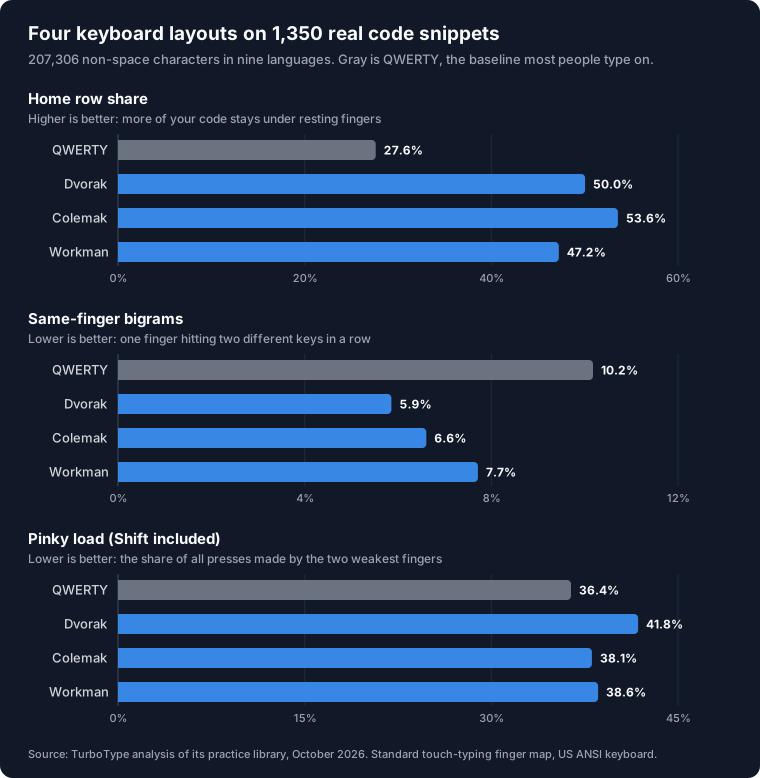
The short answer: for programming, Colemak is the best-measured alternative to QWERTY. On 1,350 real code snippets it puts 53.6% of characters on the home row against QWERTY's 27.6%, cuts same-finger bigrams from 10.2% to 6.6%, and keeps every bracket where you already expect it. Dvorak is close behind and has the fewest same-finger bigrams, but it moves brackets to the number row. And no layout fixes the real problem in code: every alternative we tested gives the pinkies more work, not less.
Key Findings
- •
Colemak puts 53.6% of code on the home row, nearly double QWERTY's 27.6%. Dvorak reaches 50.0% and Workman 47.2%.
- •
Dvorak has the fewest same-finger bigrams: 5.9% of character pairs, against 10.2% on QWERTY and 6.6% on Colemak.
- •
Every alternative raises pinky load. The pinkies make 36.4% of key presses on QWERTY, 38.1% on Colemak, 38.6% on Workman and 41.8% on Dvorak.
- •
19.1% of code characters need Shift on every layout. A layout moves keys around; it does not remove Shift.
- •
Java, TypeScript and Python gain the most from Colemak (about 57% home row). Rust gains the least (47.0%).
Source: TurboType analysis of 1,350 code snippets in nine languages, 207,306 non-space characters, October 2026. Method below.
1. Which Keyboard Layout Is Best for Programming?
Most layout comparisons are measured on English text. That is the wrong test for anyone who writes code all day, because code is roughly a quarter symbols and leans on keys that prose barely touches. So we ran the same 1,350 real code snippets from our practice library through four layouts on a standard US keyboard and measured what each one asks of your hands.
| Layout | Home row | Same-finger bigrams | Hand alternation | Pinky load | Number row |
|---|---|---|---|---|---|
| QWERTY | 27.6% | 10.2% | 48.0% | 36.4% | 11.8% |
| Dvorak | 50.0% | 5.9% | 63.7% | 41.8% | 11.7% |
| Colemak | 53.6% | 6.6% | 53.2% | 38.1% | 11.8% |
| Workman | 47.2% | 7.7% | 51.1% | 38.6% | 11.8% |
Home row is the share of characters typed from the resting position. Same-finger bigrams are two characters in a row typed by one finger on different keys, one of the slowest motions in typing. Hand alternation is how often consecutive characters switch hands, which lets one hand prepare while the other types. Pinky load counts every press by the two weakest fingers, Shift included.
On the first three measures, every alternative beats QWERTY clearly. Colemak wins on the home row, Dvorak wins on same-finger bigrams and hand alternation. On the fourth, all three lose.
2. Why Code Changes the Answer
Dvorak, Colemak and Workman were designed around English. They put common letters on the home row and split frequent letter pairs across both hands. That still works on code, because most of what you type is letters: names, keywords and function calls. It is why home-row use roughly doubles.
What the designers mostly left alone is punctuation. In our sample, 23.9% of non-space characters are symbols, and parentheses alone are about one character in 19. Colemak and Workman keep almost every symbol where QWERTY has it; Dvorak moves several. In all four, symbols cluster in the right pinky column and on the number row.
So the honest summary is this: an alternative layout makes the letter part of programming easier, and does very little for the symbol part. If you want the symbol picture in detail, our analysis of the most-used keys in programming breaks it down character by character.
3. Is Dvorak Good for Programming?
Dvorak has the best rhythm of the four: 63.7% of consecutive characters alternate hands, against 48.0% on QWERTY, and only 5.9% of pairs are same-finger bigrams.
The cost is where Dvorak puts the symbols programmers use most. Square brackets and curly braces move from the top row to the number row, a longer reach for some of the most common characters in C, Java, JavaScript and Rust. The semicolon moves to the bottom-left corner under the left pinky. The quote keys move to the top-left. Hyphen and underscore move onto the home row under the right pinky, which is a genuine gift to anyone writing snake_case in Python or Rust.
Add it up and Dvorak gives the pinkies the most work of any layout we tested: 41.8% of all presses, up from 36.4% on QWERTY. A variant called Programmer Dvorak rearranges the number row so symbols are unshifted and digits sit behind Shift. We did not measure it here, but it targets exactly this weakness.
4. Is Colemak Good for Programming?
Colemak scores highest on the measure most people care about: 53.6% of code on the home row. It also keeps QWERTY's punctuation almost untouched. The only symbol that moves is the semicolon, which goes from the home row to the top row where QWERTY has p. Brackets, braces, quotes, equals, hyphen and slash all stay in place.
That makes Colemak the easiest switch for a programmer: symbol muscle memory survives, and Z, X, C and V do not move, so neither do the common shortcuts. Same-finger bigrams fall to 6.6%, and pinky load rises only slightly, to 38.1%, mostly because o now sits under the right pinky.
The catch for Vim users: Colemak scatters h, j, k and l. Only h stays in the same physical spot, so motion keys either need remapping or relearning.
5. What About Workman?
Workman was designed to reduce the sideways stretches that QWERTY and Colemak ask of the index fingers. On code it lands between the others: 47.2% on the home row, 7.7% same-finger bigrams, and 38.6% pinky load. Like Colemak, it leaves the punctuation where QWERTY has it except for the semicolon.
Nothing in the code numbers argues against Workman if you like its feel, but it does not beat Colemak on any of these measures, and Colemak has the larger community and more learning material.
6. Why No Layout Fixes the Pinky
Here is where the most-typed programming symbols sit in each layout. Every one of them stays on a pinky, whichever layout you choose.
| Symbol | QWERTY | Dvorak | Colemak | Workman |
|---|---|---|---|---|
( ) | Number row, R ring/pinky | Number row, R ring/pinky | Number row, R ring/pinky | Number row, R ring/pinky |
[ ] { } | Top, R pinky | Number row, R pinky | Top, R pinky | Top, R pinky |
; : | Home, R pinky | Bottom, L pinky | Top, R pinky | Top, R pinky |
= + | Number row, R pinky | Top, R pinky | Number row, R pinky | Number row, R pinky |
- _ | Number row, R pinky | Home, R pinky | Number row, R pinky | Number row, R pinky |
' " | Home, R pinky | Top, L pinky | Home, R pinky | Home, R pinky |
Then there is Shift. 19.1% of the non-space characters in our code sample need Shift, and that number is identical on every layout, because whether a character is shifted belongs to the character, not to where its key sits. Parentheses, braces, colons, double quotes, underscores and angle brackets all need it. Each of those presses lands on a pinky.
So if your pinkies are what hurts, a new layout is the wrong fix. What actually moves that load:
- •
Use the opposite-hand Shift. Hold left Shift for right-hand symbols, which is nearly all of them, so both pinkies share the work.
- •
Move symbols to stronger fingers. Programmable keyboards (QMK, ZMK) can put brackets and operators on a layer under the index and middle fingers.
- •
Practise the symbol reaches until they are automatic. A slow, hesitant reach costs more than a long one. Our symbols track drills exactly these keys.
7. Which Languages Gain Most From Switching?
Home-row share by language, sorted by Colemak's result:
| Language | QWERTY | Dvorak | Colemak | Workman |
|---|---|---|---|---|
| TypeScript | 26.9% | 51.7% | 56.9% | 49.9% |
| Java | 26.4% | 52.8% | 56.7% | 50.3% |
| Python | 29.4% | 53.1% | 56.6% | 49.8% |
| JavaScript | 26.6% | 50.7% | 55.4% | 49.1% |
| PHP | 27.3% | 51.1% | 54.3% | 48.3% |
| C++ | 29.7% | 50.9% | 52.9% | 45.3% |
| HTML & CSS | 29.5% | 46.3% | 51.2% | 45.1% |
| C | 26.3% | 48.7% | 49.8% | 43.6% |
| Rust | 26.9% | 43.7% | 47.0% | 42.3% |
Wordy languages gain the most: Java, TypeScript and Python reach about 57% home row on Colemak. Rust gains the least (47.0%), because so much of it is symbols no layout moves: ::, ->, &, ' and !.
Rust is also the hardest of these languages to type in absolute terms, which our hardest programming language to type analysis measures in detail.
8. Should You Switch Layouts for Programming?
Switch if your goal is comfort on letters: less reaching and fewer same-finger jumps. Colemak gives the most of that with the least disruption, so it is our recommendation for programmers.
They do not support switching for these reasons:
- •
Pinky pain. As shown above, every alternative layout adds pinky work on code.
- •
Speed alone. Learning a new layout takes weeks to months of reduced speed, and in code a large share of time is reading and thinking, not typing.
- •
Shared machines and pair programming. You will still meet QWERTY on other people's keyboards, laptops and servers.
- •
Heavy Vim or shortcut use without the time to remap.
Whatever you decide, the symbol keys are the part of code typing that every layout leaves to you. A minute on the coding typing test will show whether your errors cluster there.
9. Method
Corpus. 1,350 code snippets from TurboType's nine language tracks: Python, JavaScript, TypeScript, Java, C, C++, PHP, Rust and HTML & CSS, 150 each. That is 207,306 non-space characters. We left out our symbol-drill track, which is deliberately symbol-heavy and would distort the result.
Model. Each character was mapped to its key on a US ANSI keyboard for each layout, with standard touch-typing finger assignments. A shifted character adds one Shift press on the opposite pinky. Space, Tab and Enter are excluded. A same-finger bigram is two consecutive characters typed by one finger on different keys; repeated keys do not count, and whitespace breaks a sequence.
Why some numbers differ from our other posts. Our keystroke analysis counted all 1,500 snippets including the symbol drills, and included the space bar and Enter, so its shares are calculated on a larger base. That is why it reports QWERTY's pinky share as 32.7% where this analysis reports 36.4%.
Limits. This is a model of where keys sit, not a measurement of people typing. It does not capture typing skill, editor autocomplete, ergonomic keyboards, or the time it takes to learn a new layout.
10. Frequently Asked Questions
What is the best keyboard layout for programming?
Measured on 1,350 real code snippets, Colemak is the best all-round choice. It puts 53.6% of characters on the home row against 27.6% on QWERTY, cuts same-finger bigrams from 10.2% to 6.6%, and leaves every bracket and operator where QWERTY has it. Dvorak has the fewest same-finger bigrams (5.9%) but moves brackets to the number row and adds the most pinky work.
Is Dvorak good for programming?
Partly. Dvorak nearly doubles home-row use on code (27.6% to 50.0%) and has the lowest same-finger bigram rate of the four layouts we tested (5.9%). But it moves square brackets and curly braces up to the number row and raises the pinkies' share of all key presses from 36.4% to 41.8%, the highest of the four.
Is Colemak good for programming?
Yes. Colemak had the highest home-row share on code of the layouts we tested (53.6%), and it keeps QWERTY's punctuation in place except the semicolon, which moves to the top row. Z, X, C and V also stay put, so undo, cut, copy and paste do not move.
Does switching keyboard layouts reduce pinky strain when coding?
Not on its own. On code, the pinkies make 36.4% of all key presses on QWERTY, 38.1% on Colemak, 38.6% on Workman and 41.8% on Dvorak. Most pinky work in code is Shift and punctuation, and every one of these layouts leaves both on the pinkies.
How much code is typed on the home row with QWERTY?
27.6% of non-space characters in our sample of 1,350 code snippets. The same code puts 53.6% on the home row in Colemak, 50.0% in Dvorak and 47.2% in Workman.
Next Steps:
- Take the 60-second coding typing test on your current layout so you have a baseline before changing anything.
- Drill the symbol keys on the symbols track. They stay where they are on every layout except Dvorak.
Related Resources:
Every keystroke in 1,500 snippets, by finger and row.
Eight languages ranked by symbols, Shift and pinky load.
A practical guide built on the same keystroke data.
Why the symbol keys cost the most time.